Foodie Pro Classic uses a “widgetized” home page template to accomplish the flexible layout that shows recent and/or featured posts in full-width or grid format. This means that you’ll configure your homepage using the Appearances -> Widget screen.
The “Foodie Pro – Featured Posts” widget used to create these sections of posts is built-in to the theme, so there’s no need for an additional plugin. Once you add widgets to the “Homepage Top“, “Homepage Middle” and “Homepage Bottom” widget areas, the theme automatically enables the widgitized home page.
Note: Instead of following this tutorial, we recommend you follow the instructions to Import the Foodie Pro Widgets to import the pre-configured widgets in your theme files: sample-data/foodieprowidgets.ie

The home page widget areas are set up to display recent and featured posts in different ways using the “Foodie Pro – Featured Posts” widget. You will drag and drop the correct widget to the corresponding widget are and then configure as you wish. Screenshots show how we have chosen to set things up for the demo site:
Homepage: Top
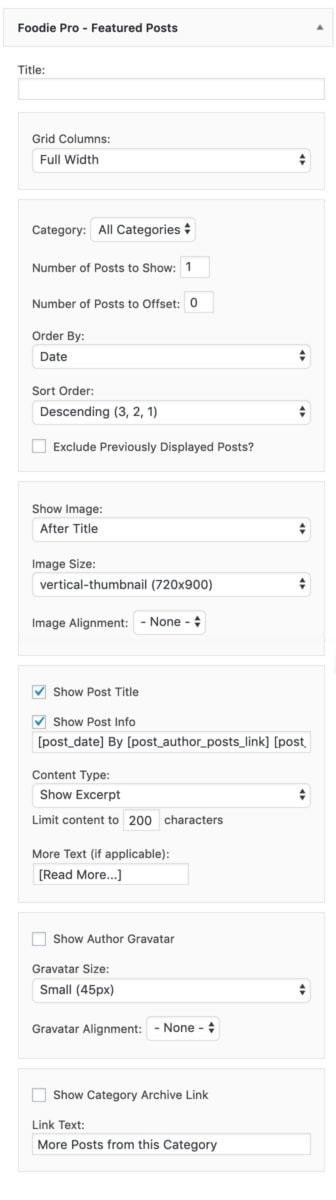
If you don’t want to show an image that you’ve embedded into the post on the homepage, change the “Show Image” section to “Don’t Show an Image“.
Also: Add an h1 to your homepage
Excerpts – Read More
In order to get your Homepage: Top to display like the demo please place an image at the very top of your posts and then in the post editor create your own excerpt by inserting the read more tag, which looks like this:
Note: We’ve stopped recommending the “read more” tag as of 2019, and no longer support it. See: why we don’t support the read more tag.
Food food blogs, we recommend only displaying the featured image and post title on the homepage and category pages. This makes the website much more user-friendly on mobile devices, which make up approximately 80% of all pageviews.
Homepage: Middle
The Homepage: Middle is designed exclusively for the Genesis eNews Extended widget. Do not add featured posts here.

The Genesis eNews Extended widget is used to set up your newsletter opt-in. This plugin is designed to be used with a newsletter service such as Mailchimp, Aweber, Mailpoet, or any of the other popular newsletter services.
You can find our full write-up at How to set up the Genesis enews widget.
Here’s the plugin info page where you can read about installation and get support: https://wordpress.org/plugins/genesis-enews-extended/
You can Google “Genesis eNews Extended + whatever service you choose” and there are bound to be some tutorials and videos to guide you in getting that set up.
Homepage: Bottom
The Home Bottom widget area can be configured to show one of 5 different options using the Foodie Pro-Featured Posts widget.
Please see the Foodie Pro demo site if you need help deciding which setup you’d like to use and then configure as follows:
One Half Grid Display Settings:

Note: we actually recommend using Content Type: No Content now. Visitors should be able to discern whether a recipe post is what they’re looking for based on the featured image + post title alone.
One Third Grid Display Settings:

One Fourth Grid Display Settings:

One Sixth Grid Display Settings:

Why isn’t there any pagination?
Pagination of the homepage (eg. unfiltered blog posts) is an outdated concept, no longer recommended or support as of 2020. This is not how people use the internet anymore.
Instead, you should be creating proper category pages, and using a proper site structure.